Evaluating the Moss 3D Text Effect Template for Modern Design Projects
In the rapidly evolving landscape of digital graphic design, texture and depth have become critical components for capturing audience attention. Among the myriad of resources available to designers, the Moss 3D Text Effect Template has emerged as a distinctive tool for creating striking, dimensional typography. This resource is not merely a static image but a fully editable framework that allows users to generate colorful, layered, and glossy text effects with relative ease. For professionals and hobbyists alike, understanding the specific utility of this template requires a look beyond its aesthetic appeal to its practical application, technical requirements, and how it compares to other methods of achieving similar visual results.
Understanding the Core Features and Aesthetic Appeal
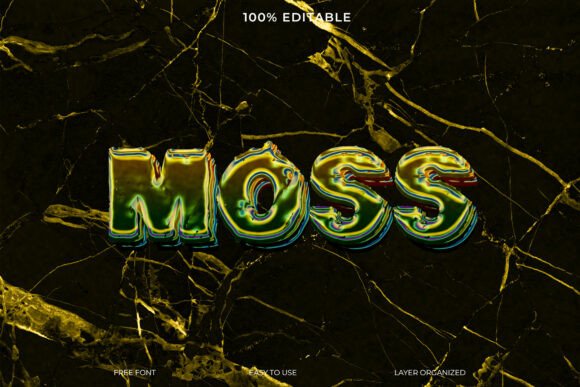
The primary draw of the Moss 3D Text Effect Template lies in its unique combination of organic texture and modern glossiness. Unlike traditional flat text or standard beveled effects, this template simulates a multi-layered structure where moss-like textures interact with vibrant, glossy surfaces. This creates a tactile quality that translates well across various media, from social media graphics to print advertisements. The design is characterized by its contemporary feel, making it particularly suitable for artistic projects that aim to blend natural elements with digital precision.
One of the most significant advantages of this template is its accessibility. It is designed to be fully editable, meaning that users are not locked into a pre-set appearance. You can modify colors, adjust lighting, and change the text itself to suit your brand identity or project requirements. Furthermore, the inclusion of a free font removes a common barrier to entry, ensuring that the final output remains consistent with the preview without requiring additional purchases or license management. This "out-of-the-box" readiness is a crucial factor for designers working under tight deadlines.
Comparing Template-Based Workflows to Manual Creation
When deciding whether to use the Moss 3D Text Effect Template, it is essential to weigh it against the alternative: creating such effects manually from scratch. Manual creation typically involves complex software like Adobe Photoshop or Illustrator, requiring a deep understanding of layer styles, blending modes, displacement maps, and lighting techniques. While this approach offers unlimited customization, it is time-consuming and demands a high level of technical proficiency.
In contrast, the template approach streamlines the process. By providing a pre-configured smart object or layer structure, the template allows users to achieve professional-grade results in minutes rather than hours. However, this convenience comes with tradeoffs. Templates are inherently constrained by their underlying structure. While you can change colors and text, you may find it challenging to radically alter the fundamental shape or texture distribution without breaking the effect. Therefore, the decision often hinges on the balance between speed and absolute creative control.
- Time Efficiency: Templates significantly reduce production time, making them ideal for rapid prototyping or high-volume content creation.
- Consistency: Using a template ensures a uniform look across multiple assets, which is beneficial for campaign coherence.
- Learning Curve: Templates lower the barrier to entry, allowing less experienced designers to produce high-quality work without mastering advanced software techniques.
Best-Fit Scenarios and Practical Applications
The Moss 3D Text Effect Template is not a one-size-fits-all solution. Its distinct aesthetic makes it particularly well-suited for specific industries and project types. For instance, brands in the eco-friendly, wellness, or outdoor recreation sectors may find the moss texture aligns perfectly with their messaging. Similarly, event posters for music festivals or art exhibitions can leverage the colorful, glossy layers to create a vibrant, energetic feel that stands out in crowded visual environments.
However, there are situations where this template may not be the optimal choice. Corporate communications that require strict adherence to minimalist or formal design guidelines might find the textured, glossy look too playful or distracting. In such cases, a cleaner, flatter typography style would be more appropriate. Additionally, if a project requires hyper-realistic integration with a specific photographic background, a custom-built 3D render might offer better lighting matching and perspective control than a template-based effect.
Evaluating Technical Requirements and Compatibility
Before integrating the Moss 3D Text Effect Template into your workflow, it is important to consider the technical environment. Most high-quality text effect templates are designed for industry-standard software such as Adobe Photoshop. Users must ensure they have the necessary version of the software to support smart objects and layer styles, which are the backbone of these editable templates. While the template includes a free font, users should verify that their operating system supports the font file format provided, typically TTF or OTF.
Another consideration is resolution. High-quality 3D effects rely on detailed textures and smooth gradients. If the final output is intended for large-format printing, users must ensure the template is set up at a sufficient DPI (dots per inch) and dimensions. Many templates are optimized for web use, so scaling them up for print may result in pixelation or loss of detail. Always check the file specifications before beginning a project to avoid costly revisions later.
Limitations and When to Seek Alternatives
While the Moss 3D Text Effect Template offers considerable value, it is not without limitations. The primary constraint is stylistic rigidity. If your design vision diverges significantly from the mossy, glossy aesthetic, forcing the template to fit may result in a compromised design. In such instances, exploring other template categories or investing time in learning manual 3D texturing techniques may yield better results.
Additionally, overuse of trendy templates can lead to a lack of originality. As more designers adopt popular resources, the risk of visual saturation increases. To mitigate this, consider using the template as a starting point rather than a final product. Customize the color palette extensively, combine it with other graphical elements, or adjust the lighting to create a unique variation that distinguishes your work from others using the same resource.
Making an Informed Decision
Choosing the right design resource involves evaluating your specific needs, skills, and constraints. The Moss 3D Text Effect Template is an excellent choice for designers seeking a quick, professional-looking solution for projects that benefit from a textured, dimensional aesthetic. It balances ease of use with visual impact, making it a valuable asset for both novices and seasoned professionals looking to streamline their workflow.
However, it is crucial to remain aware of its boundaries. If your project demands complete creative freedom, hyper-specific branding, or integration into complex 3D environments, a custom approach may be necessary. By understanding the strengths and tradeoffs of this template, you can make a more informed decision that aligns with your project goals and enhances your overall design strategy. Ultimately, the best tool is the one that effectively bridges the gap between your creative vision and the practical realities of your production timeline.