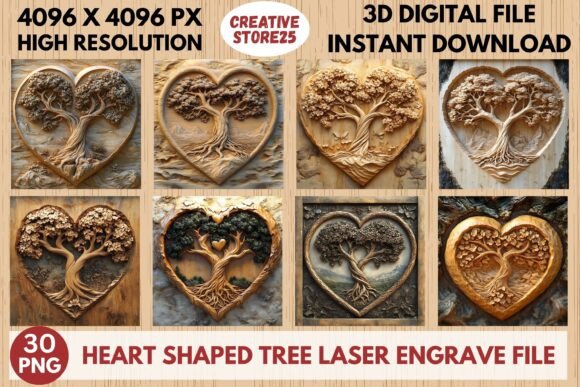
Heart Shaped Tree Laser Engrave File: Elevating Your Creative Projects with Precision
There is a distinct satisfaction in watching a laser beam trace a perfect line across wood, acrylic, or leather. For makers and designers, the difference between a good project and a great one often comes down to the quality of the source file. This is where a high-quality Heart Shaped Tree Laser Engrave File becomes an indispensable asset. It is not just about having an image; it is about having a design that translates seamlessly from your screen to physical material without losing detail or clarity.
The concept of a tree shaped like a heart is timeless. It blends the organic, grounding symbolism of nature with the universal language of love. However, finding a digital asset that captures this duality while being technically optimized for laser machinery can be surprisingly difficult. Many free files online are low-resolution, pixelated, or formatted incorrectly, leading to frustrating test burns and wasted materials. A premium, print-ready design solves these issues by providing a 3D-style aesthetic that adds depth and visual interest to flat surfaces.
Why Resolution and Format Matter in Laser Engraving
When you are working with machines like Glowforge, xTool, Sculpfun, or traditional CO2 lasers, the software interprets your design based on contrast and density. This is why the specific format of your file is critical. The Heart Shaped Tree Laser Engrave PNG File discussed here is delivered as a grayscale image, not a vector SVG. While vectors are excellent for cutting outlines, grayscale PNGs are superior for engraving because they allow for variable power settings. The darker areas tell the laser to burn deeper or slower, creating shadows and highlights that mimic a three-dimensional effect.
With a resolution of 4096 x 4096 pixels, these files offer immense flexibility. You can scale them up for large wall art or down for intricate jewelry without encountering the jagged edges that plague lower-quality downloads. This high-resolution capability ensures that the fine details of the tree branches and the curvature of the heart remain crisp, regardless of the final size. It is a practical solution for anyone who wants professional-grade results without spending hours editing images in Photoshop.
Real-World Applications for Makers and Businesses
The versatility of this design opens doors for various creative industries and hobbyist projects. Here is how different users can leverage this asset effectively:
- Wedding and Event Decor: Imagine wooden table numbers or place cards featuring this heart-shaped tree. The romantic imagery fits perfectly with wedding themes, while the precise engraving adds a touch of elegance. You can also use it on acrylic welcome signs, where the grayscale depth creates a stunning frosted glass effect.
- Personalized Gifts: For those running small Etsy shops or craft businesses, customization is key. This design serves as a beautiful base that can be paired with names or dates. Engraved on a wooden photo frame or a cutting board, it transforms a standard item into a cherished keepsake for anniversaries or Valentine’s Day.
- Fashion and Accessories: Leatherworkers can use this file to engrave detailed patterns onto wallets, journals, or bags. The 3D-style shading looks particularly sophisticated on genuine leather, adding texture and visual weight to the product. Similarly, it can be printed on fabric patches or engraved onto wooden earrings for a bohemian aesthetic.
- Home Décor: Large-scale prints on plywood or MDF can serve as striking wall art. Because the file includes transparent backgrounds, you can easily layer it over other textures or colors in your design software before sending it to the laser. This allows for creative experimentation with stained wood or painted backdrops.
Navigating the Included Files for Best Results
Understanding what you are downloading is crucial for workflow efficiency. This package includes thirty files in total: fifteen coloring PNGs and fifteen grayscale PNGs. The distinction between these two types is important for your intended outcome.
The grayscale PNGs are ready-to-use for engraving. You simply import them into your laser software, such as Lightburn, and map the black values to higher power settings. This is the most straightforward path to achieving that 3D look. On the other hand, the coloring PNGs are ideal if you plan to do multi-pass engraving or if you want to manually adjust the contrast curves to suit specific materials. For instance, some woods react differently to heat, and having a colored version allows you to tweak the tonal range to prevent burning too deeply in shadow areas.
It is important to note that these are not editable vector files. You cannot move individual branches or change the shape of the heart within the file itself. This limitation is actually a strength for consistency; it ensures that the artistic integrity of the 3D design remains intact. However, it does mean that you should plan your composition carefully. If you need to add text or other elements, do so in your laser software or a graphic design tool by layering them on top of the PNG. Always resize the image proportionally to avoid distortion.
Material Considerations and Machine Compatibility
While the file is optimized for precision, the final result will always depend on the material you choose. Hardwoods like maple, cherry, and walnut tend to produce the best contrast with grayscale engravings. The natural grain of the wood interacts with the laser burns, enhancing the organic feel of the tree design. Softer woods like pine may require lower power settings to avoid excessive charring, which can muddy the fine details of the heart shape.
For non-wood materials, such as anodized aluminum or coated metals, the grayscale approach works exceptionally well. The laser removes the coating to reveal the metal underneath, and the varying shades of gray in the PNG translate directly to varying levels of coating removal. This makes the Heart Shaped Tree Laser Engrave File suitable for industrial marking applications as well as artistic crafts.
Before starting your main project, always perform a test burn on a scrap piece of the same material. Adjust the speed and power settings to find the sweet spot where the darkest parts of the image are rich and deep, but the lightest parts remain clean and unburned. This step is essential for achieving the high-definition look that this high-resolution file promises.
Maximizing Value for Digital Creators
For digital creators and small business owners, time is money. Searching for the right clipart, cleaning up noisy edges, and converting formats can eat up hours of productive work. By investing in a pre-optimized, high-resolution package, you streamline your production process. The transparent background feature alone saves significant time, allowing you to drop the design into any project layout without needing to mask out white squares or irregular borders.
Moreover, the inclusion of multiple variations in the ZIP file provides room for experimentation. You might find that one specific grayscale variant works better for dark woods, while another provides better definition on lighter materials. Having this library at your disposal means you are prepared for a wide range of client requests or personal projects without needing to source new files constantly.
Ultimately, this design is about bridging the gap between digital artistry and physical craftsmanship. It empowers you to create pieces that look professionally designed, even if you are working from a home studio. Whether you are making a single gift for a loved one or producing inventory for a growing brand, the reliability and beauty of this heart-shaped tree design ensure that your final product stands out.